


Piano Pet: Cute Rhythm Game
4.710.00 Reviews
App Specs
- Version
- 1.4.0
- Updated On
- License
- Free
- Downloads
- 100,000+
- Developer
- RhythmMix Studios
- Categories
- Music
- Platform
- Android
Screenshots

 Analysis by AppCompare
If you’re opening a rhythm game for the first time, the best first step is to keep your goal small: learn how the beat feels before worrying about a high score. Piano Pet: Cute Rhythm Game is built around tapping and jumping in time, with music spanning K-pop, EDM, and hip-hop. I’d approach it as a quick music game rather than a deep practice tool: the appeal is the immediate mix of rhythm and a playful pet theme.
Start with the beat, not the score
On your first run, pay attention to how the on-screen action lines up with the music. A useful habit is to listen for a clear pulse before tapping, then use that pulse to guide your timing instead of reacting to every visual change at the last second. If you miss a beat, take the next one as a fresh start rather than rushing to catch up; hurried taps can make it harder to settle into the track.
That makes the game a reasonable fit for a short break, a commute with your phone in hand, or a few minutes between other tasks. Since it can be played offline, it may also suit moments when a connection is inconvenient. I would still choose a calm place to play if you want to focus on timing: background noise can make it harder to hear the beat, and rhythm games are less satisfying when you can only glance at the screen.
Who will enjoy this particular mix
The strongest match is someone who likes music games but wants a light, approachable presentation rather than a serious score-chasing routine. The pet framing gives the experience a softer feel, while the K-pop, EDM, and hip-hop mix offers different rhythmic energy. If you mainly want a familiar song library, a conventional music game may be a better fit; if you want the music to support quick tap-and-jump play, this one has a clearer purpose.
I’d also consider whether you enjoy repeating a track to improve your timing. That is a natural way to get more comfortable with rhythm play, but it will not appeal to everyone. Players looking for a broad collection of non-music activities, a narrative campaign, or a realistic instrument-learning app should look elsewhere. This is a game first, and its value depends on whether its central beat-based challenge feels fun to return to.
A realistic first session
Imagine you have a few minutes to spare before meeting a friend. I’d open the game, pick a track that feels comfortable, and focus on completing a run rather than trying to perfect every input. Afterward, I’d think about whether the difficulty came from hearing the beat, reading the screen, or simply getting used to the timing. That small distinction gives you a practical next step: listen more closely, watch the action earlier, or replay once at a steadier pace.
This is more useful than treating every missed input as a vague lack of skill. Rhythm play asks you to coordinate sound and movement, and the first attempt may feel awkward even when the basic controls are simple. A short, deliberate session can tell you whether you enjoy that kind of coordination without turning a casual game into homework.
Worth Reading Before You Choose

EA SPORTS FC Mobile 26 Is a Bigger Football Game, but It Takes Time

Flipboard Shows What News Apps Must Do Beyond the Feed

Switching to Android Auto Means Rethinking Your Driving Routine

Google Calendar Makes a Crowded Week Easier to Manage

Ludo King Makes the Most of the Minutes Between Plans

Baby Panda World Brings Quick Play to Modern Phones, but Its Game Library Feels Busy
What to keep in mind before settling in
Offline play is a welcome convenience, but it does not make every situation ideal for playing. You still need to see the screen and hear enough of the music to follow the rhythm, so a noisy room or a distracting task can undermine the main challenge. For the same reason, I would not use it while walking through busy areas or doing anything that needs your attention.
It is also worth setting expectations around the music itself. The confirmed musical range points to K-pop, EDM, and hip-hop, so anyone hoping for a wide spread of classical or jazz should not assume those styles are part of the experience. The game’s focus is narrower than a general-purpose music app, and that focus is a strength only if those beats are what you want.
For someone deciding between this and a standard tile-tapping rhythm game, the choice comes down to presentation and purpose. A more conventional option may suit players who care most about a familiar format or a particular song catalog. Piano Pet makes more sense when the combination of a cute game identity and beat-led movement is part of the appeal. I would choose based on the kind of session I want, not on an assumption that every rhythm game offers the same music or challenge.
First Impressions: A Cute Overload
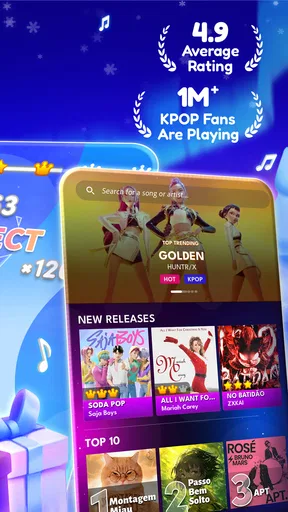
From the moment I launched Piano Pet: Cute Rhythm Game, I was greeted with an explosion of colors and cuteness. The app has this irresistible charm that’s hard to ignore. The home screen is a vibrant array of adorable pets just waiting to be your musical companions. I mean, who can resist those big, animated eyes?
The interface is super user-friendly, which is a big win in my book. Everything is laid out clearly, and it didn’t take long for me to find my way around. If you’re new to rhythm games, don’t sweat it. The app does a fantastic job of easing you in with a brief tutorial that gets you started on the right paw.
Gameplay: Tap, Tap, Hooray!
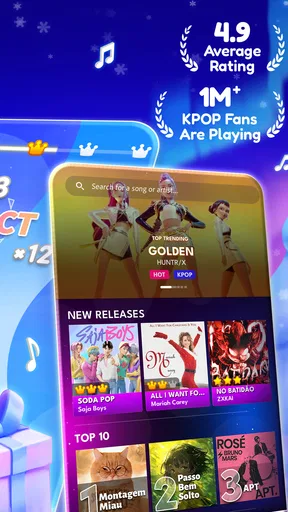
Now, let’s talk about the gameplay. The core of Piano Pet revolves around tapping along to the beat of catchy tunes. The game offers a wide array of songs across different genres, so there’s something for everyone. Whether you’re into pop, classical, or jazz, you’ll find a track that’ll get your fingers dancing.
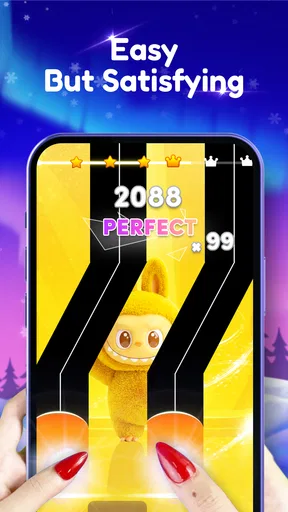
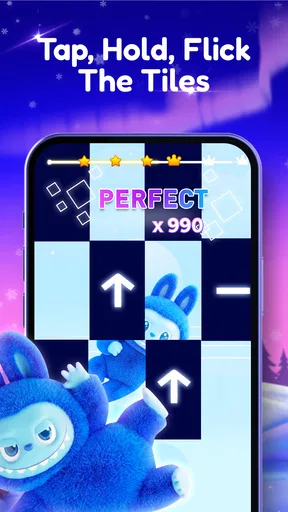
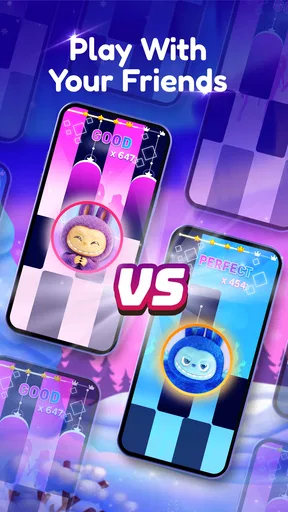
The mechanics are simple but addictive. Tap the tiles as they appear on the screen and keep up with the rhythm to score points. As you progress, the levels get more challenging, testing your reflexes and timing. It’s one of those games that’s easy to pick up but hard to master. And trust me, once you start, it’s hard to stop!
Adorable Pets and Customization
What sets this app apart from other rhythm games are the cute pets that accompany you on your musical journey. You can choose from a variety of pets, each with their own unique animations and personality. It’s like having a digital band of furry friends cheering you on!
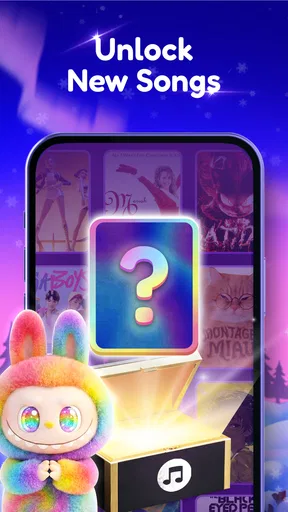
Customization is also a big part of the fun. As you play, you earn coins and rewards that can be used to unlock new pets and outfits. Dressing up your pet in quirky costumes adds an extra layer of personalization, making the experience even more engaging. Plus, who doesn’t love a well-dressed digital pet?
Visuals and Soundtrack
The visuals in Piano Pet are simply delightful. The graphics are crisp, colorful, and full of personality. It’s clear that a lot of love and attention went into designing each character and background. The animations are smooth, making the gameplay feel seamless and enjoyable.
And let’s not forget the soundtrack! The music selection is diverse and well-curated, featuring both popular hits and original tracks. The sound quality is top-notch, which is crucial for a rhythm game. There’s nothing like tapping away to a catchy beat and feeling the music pulse through your fingertips.
Wrapping It Up: A Must-Try for Music Lovers
In conclusion, Piano Pet: Cute Rhythm Game is a charming and addictive app that’s perfect for music lovers and anyone who appreciates a bit of cuteness in their gaming experience. The combination of engaging gameplay, adorable pets, and a fantastic soundtrack makes it a standout in the rhythm game genre.
Whether you’re looking to pass the time, challenge your reflexes, or simply enjoy some good tunes, this app delivers on all fronts. It’s a joy to play and a feast for the senses. So, why not give it a try? You might just find yourself tapping along to the beat with a new furry friend by your side!
Who should give it a try—and who should pass
I’d recommend it to someone who wants a low-pressure way to engage with music for a few minutes at a time, especially if a cute presentation makes a game more inviting. It is free, rated for Everyone, and developed by RhythmMix Studios. Its current version is 1.2.0, and it needs Android 7.0 or later. Those practical details make it easy to consider as a casual download, but they don’t change the central question: do you enjoy matching quick actions to a beat?
The audience figure is over 100,000 installs, while its average rating is currently 0.0. I wouldn’t treat that average as a verdict on how the game feels; it simply offers no useful consensus for deciding whether the rhythm style suits you. If you are choosing for a younger player, the Everyone content rating is reassuring, but I’d still check that the tapping format and music are a good fit for the child’s interests.
Make the first run more useful
Rather than switching between tracks quickly, I’d stick with one that feels readable and use the first attempt to learn its pulse. Then, on a later run, focus on one adjustment: anticipate the beat slightly, relax your tapping hand, or keep your eyes on the action instead of glancing around the screen. Changing only one thing makes it easier to tell what helped. This is a practical way to turn a casual retry into a small improvement without needing a practice mode or a complicated routine.
If the music feels hard to follow, try playing somewhere quieter and at a comfortable listening level. The game’s central task links audio and visual cues, so turning the sound off or splitting your attention may make the experience less clear. Offline availability is handy for travel or weak reception, but I’d start a session before you need to put your phone away; a rhythm game is not something I’d recommend trying to play while moving through a crowded station or crossing a street.
Where it sits among music games
Compared with music games that center on a large catalog or a more demanding score chase, this one’s appeal is the combination of rhythmic action and a pet-themed presentation. That makes it an easier recommendation for someone who wants an inviting, playful break than for a player comparing games by song selection alone. If your main aim is to discover new music, use a music-streaming app; if you want to learn piano technique, choose a dedicated lesson tool. This game’s purpose is to make following a beat entertaining, not to replace either.
There is a trade-off in that focused design. A player who loves the cute characters but does not enjoy repeated timing challenges may lose interest once the novelty wears off. Likewise, someone who wants precise control over a broad range of genres should pick a game that is built around that priority. I’d choose this one when I want a compact, cheerful rhythm session, and choose a different option when the soundtrack itself or structured musical instruction matters more.
Small expectations that prevent frustration
It helps to think of a missed tap as feedback about timing, not as proof that the game is unfair or that you are bad at rhythm. Give yourself a few attempts to become familiar with how the beat and screen action work together. If it still feels uncomfortable, there is no need to force it: not every player enjoys reacting in time, and a slower puzzle or a passive music app may be a better way to unwind.
One other expectation to set is that a cute theme does not make the core activity automatic. You still need to watch, listen, and respond, which is why the game works best when you can give it your attention. For an everyday wind-down, I’d play after a task is finished rather than while juggling messages or conversation. That small choice makes a short session feel more satisfying and gives the music room to do its job.
A sensible next step
For a first-time player, the most reassuring route is simple: open the game, follow its introductory guidance, choose a comfortable starting point, and aim to finish a run while learning the rhythm. After that, decide whether you want to repeat a track to improve or return later for another quick session. You do not need to turn it into a commitment; its free price makes trying the basic experience an easy decision for curious music-game fans.
The best reason to install it is the specific blend of cute pets and beat-led play, not an expectation that it will serve every musical purpose. RhythmMix Studios gives that idea a bright, accessible frame, and the offline option makes it convenient when you are away from a steady connection. I’d give it a try if a lively, playful music game sounds like a good fit, while keeping a more traditional rhythm title or a dedicated music-learning app in mind for different needs.
Pros
- Engaging rhythm gameplay mechanics.
- Adorable pet-themed graphics.
- User-friendly interface for all ages.
- Regular updates with new songs.
- Supports offline play.
Cons
- Limited free song selection.
- In-app purchases can be pricey.
- Occasional ad interruptions.
- No multiplayer mode available.
- Requires frequent updates for new content.
FAQs for Piano Pet: Cute Rhythm Game
What is Piano Pet: Cute Rhythm Game?
Piano Pet: Cute Rhythm Game is a delightful mobile app that combines the joy of playing the piano with the charm of caring for virtual pets. Players engage in rhythm-based challenges, unlocking new tunes and adorable pets as they progress. It's designed to be both entertaining and relaxing, appealing to music and pet lovers alike.
Is Piano Pet: Cute Rhythm Game suitable for all ages?
Yes, Piano Pet: Cute Rhythm Game is designed to be suitable for players of all ages. Its intuitive interface and engaging gameplay make it accessible for younger audiences, while the increasing difficulty levels provide a challenge for older players. Parents can feel comfortable allowing their children to enjoy this fun and educational app.
What are the main features of Piano Pet: Cute Rhythm Game?
The main features of Piano Pet: Cute Rhythm Game include a variety of musical tracks to master, a collection of adorable pets to unlock and care for, and customizable piano themes. Additionally, the game offers daily challenges and rewards, enhancing replayability and keeping players engaged with fresh content.
Does Piano Pet: Cute Rhythm Game require an internet connection?
Piano Pet: Cute Rhythm Game can be played offline, allowing users to enjoy the game without a constant internet connection. However, some features such as daily challenges and updates may require connectivity. This ensures that players can enjoy the core gameplay anytime, anywhere, without interruption.
Are there in-app purchases in Piano Pet: Cute Rhythm Game?
Yes, Piano Pet: Cute Rhythm Game offers in-app purchases. Players can buy virtual currency to unlock premium content such as exclusive pets, songs, and themes. While the game is free to download and play, these optional purchases can enhance the gaming experience and provide additional customization options.


